
Spottrack: Package Tracker
KidgyShopping
2.025.00 Reviews
- Version
- 1.2.5
- Installs
- 100.00K
- Age Rating
- Everyone
Screenshots
Our Review of Spottrack: Package Tracker
 Analysis by Appyee
I judge a parcel tracker less by how polished its screen looks than by how clearly it tells me what it can actually do. With a shopping app, tracking numbers and delivery updates can reveal details about purchases and routines, so I want practical convenience without being pushed into sharing more than I need to. Spottrack: Package Tracker is built around bringing shipments together, but I’d approach any such tool with sensible expectations: it can make checking parcels easier, while the carrier remains the source of the delivery information.
What a tracker can—and cannot—settle
For me, the main appeal of a multi-carrier tracker is reducing the little bits of work that pile up after ordering: finding confirmation messages, copying a tracking number, and checking separate carrier pages. Spottrack is a free shopping app from Kidgy, and its basic premise is useful if you regularly have parcels in transit. It has a 2.0 average from around 1,100 ratings, so I would not treat its convenience as a guarantee of a smooth experience for everyone. That rating is a reason to test it with a low-stakes delivery before making it part of an important routine.
A tracker also cannot make a carrier scan a parcel sooner or correct a delayed scan. If the tracking trail pauses, the useful question is whether the carrier has updated its records, not whether repeatedly refreshing the app will move the package along. I’d keep the carrier’s own tracking page handy when a delivery is urgent, and use an aggregator for the everyday overview. That division of roles is especially sensible for expensive, time-sensitive, or work-critical shipments.
Visible choices and privacy-minded habits
I would begin with one tracking number and pay attention to what the app asks me to do. Adding a number manually is a deliberate action; it also means I can choose which parcels appear in a tracking tool rather than treating every purchase as something that must be collected in one place. If the app presents optional prompts or asks for access that seems unrelated to checking a shipment, I’d pause and decide whether that access is necessary for my own use. I would not assume a particular permission or data practice without checking the current app screens and privacy information myself.
A practical habit is to remove or stop monitoring a parcel once it has arrived, if the app provides a clear way to do so. That keeps an active list useful and limits how long old order details remain in view. I’d also avoid putting tracking details for gifts or shared household purchases into a tracker unless I’m comfortable having those deliveries visible on the device. These are simple choices, but they matter when a phone is shared or someone else can see its screen.
Spottrack is rated for Everyone and is listed as version 1.2.5, with Android 8.0 as the minimum operating system. It has over 100,000 installs, and optional in-app purchases are listed from $4.99 to $14.99 per item. I’d check the purchase screen carefully before agreeing to anything paid, especially if I only need basic tracking. The free entry point makes it easy to try, but the presence of purchases is a reason to understand what is optional before tapping through a prompt.
First Impressions
So, first things first, downloading Spottrack: Package Tracker was a breeze. Available on both Android and iOS, it’s super easy to grab from the app stores. Right off the bat, the interface is clean and intuitive. I was pleasantly surprised by how user-friendly it is. You don’t need to be tech-savvy to navigate through its features, which is always a huge plus in my book.
Tracking Made Easy
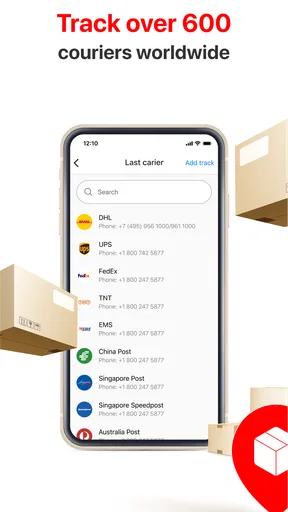
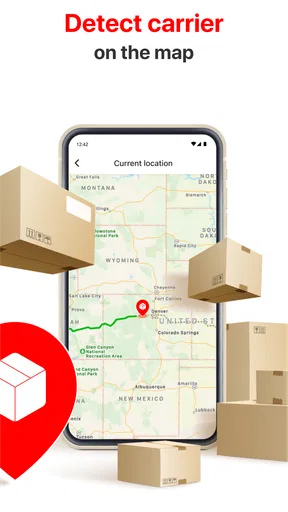
One of the standout features is the app’s capability to track multiple packages from various couriers. I know what you’re thinking—"Isn’t that standard?" Well, sure, but the way Spottrack does it feels seamless. You simply input your tracking number, and the app does the rest. It automatically identifies the courier and keeps you updated with real-time notifications. No more switching between different courier sites; everything’s in one place.
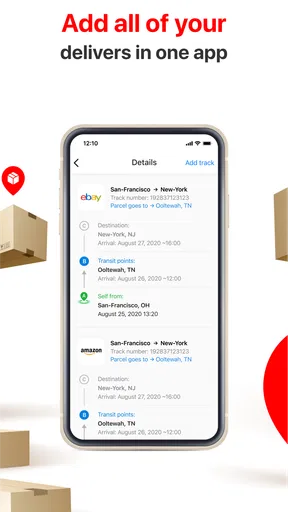
For a realistic example, imagine ordering household essentials from two shops and a replacement charger from a third. Rather than searching through three order emails during the day, you can enter each tracking number and check the shipment list together. That is most useful when you only need a quick sense of which parcels are still moving. I would still open the carrier’s own page if a status is unclear or if a delivery detail needs action; a combined view saves navigation, but it does not replace the carrier’s official record.
One small workflow choice makes a difference when several deliveries are active: add parcels as soon as you have their tracking numbers, then give each one a quick glance after a meaningful status change rather than checking constantly. This turns the app into a short check-in tool instead of another screen to refresh whenever you have a spare moment. If you manage orders for other people, keep the tracking number and parcel identity clear in your own notes before adding them; otherwise, a tidy list can still become confusing when several packages are moving at once.
Real-Time Notifications
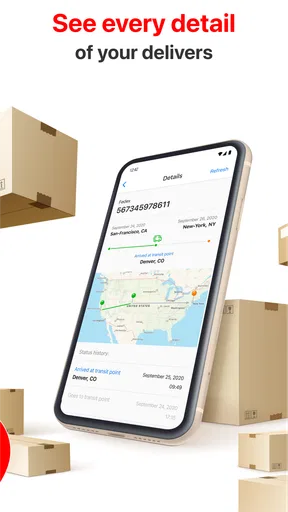
If you’re someone who likes to stay in the loop, Spottrack’s real-time notifications are a game-changer. You get instant updates on your parcel’s journey, from dispatch to delivery. I found this particularly handy when I was waiting for a time-sensitive package. The app even alerts you if there are any delays, so you’re never left in the dark.
Notifications are most valuable when they change what you need to do. A delivery update can help me decide whether to stay home, ask someone else to receive a parcel, or check the carrier’s instructions. But alerts can also become noise if I already receive shipping messages from shops or couriers. I’d start with the app’s default notification behavior and adjust it only if the controls are visible and useful on my device. For a parcel that does not need close attention, checking the list when convenient may be less distracting than treating every status change as urgent.
There is also a difference between a status update and a precise arrival promise. I would use an estimated delivery date as a planning aid, not as a reason to rearrange a whole day unless the carrier’s own information supports that decision. Scans can arrive late, and a tracking history can look temporarily still even while a parcel is moving. When a package is important, the sensible workflow is to confirm the latest details with the carrier and use the app as a convenient place to notice that something has changed.
Multiple Language Support
Another cool aspect is its support for multiple languages. This makes it accessible to a global audience, which is a thoughtful touch. Whether you’re in the US, Europe, or Asia, you can set the app to your preferred language, making the tracking process even smoother.
That can be helpful for people who are more comfortable reading app menus in a language other than the one used by a carrier’s website. It does not necessarily change the wording or detail supplied by the carrier, so I would not expect translated menus to resolve an ambiguous tracking status. If you are coordinating a delivery with a family member who uses another language, a shared understanding of the carrier’s status is still worth checking before making plans around it.
Neat and Tidy Design
Okay, I have to mention the design again because it’s just that good. The dashboard is straightforward, displaying all your active parcels with estimated delivery dates. You can customize your dashboard to highlight the packages you’re most concerned about. It’s a small detail, but one that I found incredibly useful when managing multiple deliveries.
The practical benefit of an organized dashboard is not simply having every parcel on one screen; it is being able to tell at a glance which delivery deserves attention. I’d put a parcel with a narrow delivery window or a needed replacement near the top of my own check routine, while leaving routine purchases alone until their status changes. That distinction helps prevent a long list of ordinary orders from burying the one package that actually affects the day.
There is a trade-off, though: a combined list is only as helpful as the information it receives and the labels I can recognize. If two parcels have similar statuses, I would confirm which tracking number belongs to which order before taking action. For anyone who tracks only one or two shipments a month, opening a carrier’s page directly may be just as quick and may involve fewer steps. Spottrack makes more sense when the number of separate tracking pages has become a repeated nuisance.
Who will get the most from it
I see the clearest fit for people who shop online often enough to have several deliveries overlapping, or anyone who receives parcels from different couriers and wants a central place to check progress. It may also suit a household organizer who handles orders for several people, provided they are comfortable entering those tracking numbers and keeping the device’s parcel list private. The app’s appeal is convenience through consolidation, not a new way to place orders or manage a whole household’s shopping.
I would skip it if you rarely have more than one package in transit, prefer not to enter tracking details into an additional app, or depend on a carrier’s own tools for delivery instructions and exception handling. It is also not the right sole source for a shipment where a missed update could have serious consequences. In those cases, use the carrier’s official tracking and contact channels first; an aggregator is better as a handy overview than as the final authority.
How it compares with the usual options
The usual alternatives are straightforward: open each carrier’s site or app, or rely on shipping emails and notifications from the store where you ordered. Carrier tools are often the better place to handle delivery-specific actions, while shop messages can be convenient because they arrive alongside order details. Spottrack’s advantage is having multiple parcel journeys together, which can cut down on app-switching when purchases are spread across sellers and couriers.
The trade-off is another app to maintain and another place where tracking details are entered. If you are already happy with a retailer’s updates, a separate tracker may add little. If your inbox is crowded or you have several carriers to check, keeping a consolidated view can be worthwhile—provided it works reliably for the shipments you care about. I’d test it with ordinary orders first, then decide whether it earns a place in my regular routine.
Security and Privacy
In today’s world, security and privacy are paramount. Spottrack takes this seriously, ensuring your data is protected. The app doesn’t require unnecessary permissions, which is a relief. I felt confident using it, knowing my information was secure.
My own trust test would be more cautious than a general impression: I’d look at the permissions shown on my device, read the app’s current privacy information, and pay attention to any account or consent choices presented during setup. Those screens can change, so I would not treat a reassuring first impression as a substitute for checking them. If I cannot understand why a requested permission is needed for the task I want to do, I would decline it where possible or choose a carrier’s own tracking page instead.
Tracking numbers are not the same as payment credentials, but they can still connect a person to a purchase and a delivery location. I’d avoid sharing screenshots that expose tracking details, and I would be particularly careful when monitoring a present, a work delivery, or a parcel for someone else. These habits do not require technical expertise; they are simply a way to keep a convenience app from making private delivery information more visible than intended.
Final Thoughts
All in all, Spottrack: Package Tracker is a solid choice for anyone looking to streamline their package tracking process. Its real-time notifications, user-friendly interface, and robust security measures make it stand out from the crowd. Whether you’re an occasional shopper or a dedicated deal hunter, this app is sure to make your life a whole lot easier.
So, next time you’re anxiously waiting for a package, give Spottrack a try. Trust me, you won’t be disappointed. Happy tracking!
A measured recommendation
I would treat this as a low-commitment trial rather than an automatic recommendation. It is free to start, and the app has been available since October 23, 2020, but a 2.0 average from around 1,100 ratings is a clear cue to judge it on your own phone rather than assume it will suit everyone. Add one non-urgent shipment, see whether the courier is recognized and whether the updates are useful, then decide if the combined view saves enough effort to keep using it.
The key questions are practical: can you add the carriers you commonly use, do the alerts help rather than distract, and are the visible controls and privacy choices comfortable for you? If the answers are yes, Spottrack can be a handy companion for a busy delivery week. If tracking stays patchy, the list is more work than your usual routine, or you simply do not want a separate place for parcel details, return to carrier pages and retailer messages without feeling you are missing an essential tool.
Verdict
Strengths of Spottrack: Package Tracker
- Supports tracking for multiple carriers.
- User-friendly interface with easy navigation.
- Real-time updates on package status.
- Custom notifications for important updates.
- Secure login with multiple authentication options.
Limitations of Spottrack: Package Tracker
- Limited offline functionality.
- In-app ads can be intrusive.
- Some features require a premium subscription.
- Occasional delays in tracking updates.
- Lacks detailed analytics for tracking history.
Similar Picks in This Category
View All
SHEIN-Shopping Online
Roadget Business PTE. LTD.4.8

Amazon Shopping
Amazon Mobile LLC4.4


Mercado Libre: Compras online
Mercado Libre4.8

Wish: Shop and Save
Wish US Holdings LLC4.7

Alibaba.com - B2B marketplace
Alibaba Mobile4.4
Frequently Asked Questions
What platforms is Spottrack: Package Tracker available on?
Spottrack: Package Tracker is available for both Android and iOS devices. You can download it from the Google Play Store for Android or the Apple App Store for iOS. Ensure your device meets the app’s system requirements for optimal performance and compatibility.
How does Spottrack: Package Tracker work?
Spottrack: Package Tracker allows users to easily track their packages by entering the tracking number provided by the courier. The app consolidates tracking information from multiple carriers, providing real-time updates and notifications on the status and location of your packages.
Is Spottrack: Package Tracker free to use?
Spottrack: Package Tracker offers a free version with basic features that are suitable for most users. However, there is also a premium version available that offers additional features such as ad-free experience, priority support, and advanced tracking options for a subscription fee.
Does Spottrack: Package Tracker support all courier services?
Spottrack: Package Tracker supports a wide range of international and local courier services. The app is continually updated to include new carriers, ensuring comprehensive coverage. However, it’s advisable to check the app's carrier list to confirm support for your specific courier before downloading.
Can I track multiple packages simultaneously with Spottrack: Package Tracker?
Yes, Spottrack: Package Tracker allows you to track multiple packages at the same time. You can add multiple tracking numbers and manage them within the app. The interface is user-friendly, enabling you to organize and monitor all your shipments efficiently.
